Difference between revisions of "Accounting Finance:Hiring Process"
Jump to navigation
Jump to search
m |
|||
| (18 intermediate revisions by 2 users not shown) | |||
| Line 4: | Line 4: | ||
==Step One: Place an ad on Indeed== |
==Step One: Place an ad on Indeed== |
||
| − | + | :1. Click this link: [https://www.indeed.com/ Indeed] |
|
| − | : |
+ | :2. Sign up by creating a new account with your uniPHARM e-mail. |
| − | : |
+ | :3. On the right hand side of the webpage, click the blue icon that says '''Post a Job'''. |
| − | [[File:H3.PNG| |
+ | [[File:H3.PNG|500px]] |
| − | : |
+ | :4. Follow the steps in the '''Post a Job''' section to create the job ad. |
| − | [[File:H5.PNG| |
+ | [[File:H5.PNG|400px]] |
==Step Two: Review and Screen the Resumes== |
==Step Two: Review and Screen the Resumes== |
||
# Candidates for the position will apply where you can review and screen them. |
# Candidates for the position will apply where you can review and screen them. |
||
| − | # Under |
+ | # Under '''Candidates''' click '''Awaiting Review''' (right hand side of screen) to review resumes and screen candidates (listed on the left hand side). Each resume reviewed asks you’re interest level in the candidate where you may select '''Yes''', '''Maybe''', or '''Reject'''. [[File:H6.PNG|500px]] |
| − | # From there you can shortlist the candidates and alter their |
+ | # From there you can shortlist the candidates and alter their '''Status''' to: |
## Reviewed |
## Reviewed |
||
## Phone Screened |
## Phone Screened |
||
| Line 26: | Line 26: | ||
==Step Three: Perform the Interview== |
==Step Three: Perform the Interview== |
||
| − | + | # Begin the interview by: |
|
| − | + | ## Introducing yourself; |
|
| − | + | ## Introducing the company; and |
|
| − | + | ## Discussing the position that the candidate applied for. |
|
| − | + | # Ask approximately '''FIVE''' questions to the interviewee to gauge their abilities, interest, and personality to see if they will be a ‘right fit’ for the position, the company, and the culture of the workplace. |
|
| − | + | # Once completed, call the Manager or a Supervisor to assist in conducting the “practical section” of the interview where the candidate is shown where they will be working and what they will be doing. |
|
| − | + | # After, let the candidate know that they will be informed in a certain period of time if they have the job and thank them for their time. |
|
==Step Four: Perform Employment Reference Checks== |
==Step Four: Perform Employment Reference Checks== |
||
| − | + | # Complete Employment Reference Checks from at least 2 or 3 references provided by the candidate. |
|
| − | + | # Use the '''Reference Check Form''' {{unc|\\superserver.unipharm.local\Forms\Manager\Interviews\Reference Evaluation.doc}} to assist in completing this step. |
|
| − | + | # Compile all the necessary information that has been provided by references |
|
==Final Step== |
==Final Step== |
||
| − | + | # Have the manager or supervisor look over the information and decide to hire the candidate or to keep looking. |
|
| − | + | # If deciding to hire a candidate, it is best to call them on the number provided on their resume and inform them of their start date and to show up approximately 15-minutes before starting to be introduced to their supervisor and co-workers. |
|
| + | # Forward the new employee's resume and email basic information such as wage, working hours and social insurance number to the Manager, Finance. The Manager, Finance will release the '''New Employee Orientation Checklist''' {{unc|\\superserver.unipharm.local\Employee Changes}} to have certain tasks completed prior to the arrival of the new employee. |
||
| + | # The Manager, Finance will email a meeting invite, during the first week, to the new employee to sign documentation and review benefits. |
||
[[Category:Workflows-Finance]] |
[[Category:Workflows-Finance]] |
||
Latest revision as of 10:51, 21 November 2017
Overview
This section will go over the hiring process including setting up an online ad and steps when conducting an interview.
Step One: Place an ad on Indeed
- 1. Click this link: Indeed
- 2. Sign up by creating a new account with your uniPHARM e-mail.
- 3. On the right hand side of the webpage, click the blue icon that says Post a Job.

- 4. Follow the steps in the Post a Job section to create the job ad.

Step Two: Review and Screen the Resumes
- Candidates for the position will apply where you can review and screen them.
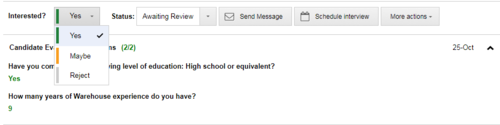
- Under Candidates click Awaiting Review (right hand side of screen) to review resumes and screen candidates (listed on the left hand side). Each resume reviewed asks you’re interest level in the candidate where you may select Yes, Maybe, or Reject.
- From there you can shortlist the candidates and alter their Status to:
- Reviewed
- Phone Screened
- Interviewed
- Offer Made
- Rejected
- Hired
- Call or e-mail the candidates you have shortlisted and selected to set up an interview in person. Ask them to bring a list of 2 or 3 references along with them as well.

Step Three: Perform the Interview
- Begin the interview by:
- Introducing yourself;
- Introducing the company; and
- Discussing the position that the candidate applied for.
- Ask approximately FIVE questions to the interviewee to gauge their abilities, interest, and personality to see if they will be a ‘right fit’ for the position, the company, and the culture of the workplace.
- Once completed, call the Manager or a Supervisor to assist in conducting the “practical section” of the interview where the candidate is shown where they will be working and what they will be doing.
- After, let the candidate know that they will be informed in a certain period of time if they have the job and thank them for their time.
Step Four: Perform Employment Reference Checks
- Complete Employment Reference Checks from at least 2 or 3 references provided by the candidate.
- Use the Reference Check Form [1] to assist in completing this step.
- Compile all the necessary information that has been provided by references
Final Step
- Have the manager or supervisor look over the information and decide to hire the candidate or to keep looking.
- If deciding to hire a candidate, it is best to call them on the number provided on their resume and inform them of their start date and to show up approximately 15-minutes before starting to be introduced to their supervisor and co-workers.
- Forward the new employee's resume and email basic information such as wage, working hours and social insurance number to the Manager, Finance. The Manager, Finance will release the New Employee Orientation Checklist [2] to have certain tasks completed prior to the arrival of the new employee.
- The Manager, Finance will email a meeting invite, during the first week, to the new employee to sign documentation and review benefits.