Difference between revisions of "Information Systems:Updating MMBC"
| Line 20: | Line 20: | ||
#Copy formulas from BO3:DQ3 and paste into current spreadsheet. |
#Copy formulas from BO3:DQ3 and paste into current spreadsheet. |
||
#Copy formulas down to bottom of data records and paste on current spreadsheet. |
#Copy formulas down to bottom of data records and paste on current spreadsheet. |
||
| − | #Copy from column BO (go to the very bottom) and now copy the remaining rows that contain all the totals into the new spreadsheet. Note: you will probably have to edit |
+ | #Copy from column BO (go to the very bottom) and now copy the remaining rows that contain all the totals into the new spreadsheet. Note: you will probably have to edit the formulas to account for new data records. |
| − | the formulas to account for new data records. |
||
==Upload File from Excel== |
==Upload File from Excel== |
||
Revision as of 14:30, 13 June 2019
Overview
This is a non-profit organization that is fully financed by industry to manage residential packaging and printed paper recycling programs in BC, either directly or by working with local governments, First Nations, private companies, and other non-profit organizations. (https://recyclebc.ca/)
- Notes: The goal is to have the manufacturer of a specific item be responsible for any packaging material and register/pay to MMBC the costs of recycling this material. For any manufacturer that is not registered with MMBC, the obligation falls to the distributor or retailer. uniPHARM has decided that we will pay (if needed) based on the sale of the item(s) to the retailers.
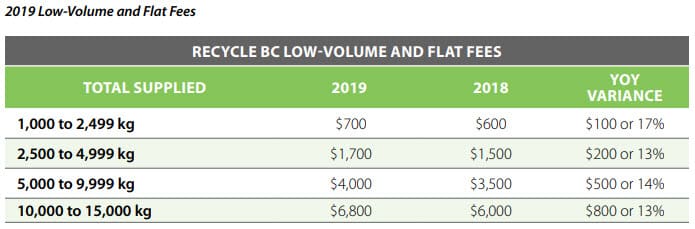
MMBC has developed volume thresholds that have changed since the program was first introduced. These can be found on the website below.
Instructions
- Typically this work would be done at the beginning of a year - looking at the data from the past year.
Download File to Excel
To generate the data file from the previous years sales information; In InfoNet, go to UniView / Sales Statistics / Summarized Item Sales. Set ‘From Year/Month’ and ‘To Year/Month’ so that the entire year is included, and click on ‘Search’. Then click on ‘MMBC to Excel’.
This will create an Excel file of item information, sales, and MMBC rates that have been previously uploaded. Items with main suppliers that are registered with MMBC are not included.
The user can key in new rates, calculate our payment, then upload the updated rates back into the I.
- The file is saved on superserver/buying/common/Multi Material BC (example: sls2018.xlsx)
- Open the previous years spreadsheet. Copy columns BN1:DR2 (headers) and past into current years spreadsheet.
- Copy formulas from BO3:DQ3 and paste into current spreadsheet.
- Copy formulas down to bottom of data records and paste on current spreadsheet.
- Copy from column BO (go to the very bottom) and now copy the remaining rows that contain all the totals into the new spreadsheet. Note: you will probably have to edit the formulas to account for new data records.
Upload File from Excel
Save the updated file as CSV. This must be in the same format as was previously downloaded – you cannot insert or remove columns (however, you can add columns to the end; they will be ignored in the upload). In InfoNet, go to Maintenance & Lists / MMBC / Upload CSV File. After it has been uploaded, the first 50 records of the file will be displayed. If they look correct – like, for example, everything is in the correct column – click on ‘Update’.
The upload runs WebSmart program IN_MMBC01, which calls CL program MMBC01 to copy the file from the IFS to the data base file MMBCINTF.
The update function in IN_MMBC02 calls CL program MMBC02, which calls RPG program MMBC03.
MMBC in InfoNet Partner Maintenance
A 'user defined field can be added to indicate whether or not the vendor is registered with MMBC. The options are -
In Progress
No            uniPHARM brings the product into BC, and is responsible
BC Resident   vendor that creates the paper and packaging is responsible
Yes           vendor is responsible
MMBC in InfoNet Item Maintenance
If the main supplier is registered, the MMBC source is changed to 'Vendor Registered with MMBC', and not changes are allowed.
When changing the MMBC manually, the options are -
Averaged
BC Resident
Estimated
Manually Weighed
N/A
Vendor Registered with MMBC
Vendor Supplied
Yes